2009/02/10


これは朗報。
Google App Engine Blog: SDK version 1.1.9 Released
  • You can now use the Python standard libraries urllib, urllib2 or httplib to make HTTP requests. This has been a frequent request on our issue tracker.
  • We've been working on a set of tools that will make the process of uploading and downloading data from App Engine applications easier. Today we're excited to announce an early release of our new bulk uploading client. You can try it out here. Let us know what you think in our Google Group!
  • Several updates to our datastore, including the automatic generation of single property indexes and the addition of IN and != operators to db.Query. See the Datastore API docs for more details.
  • A bunch of additional bugfixes and enhancements, listed in our Release Notes.
http://googleappengine.blogspot.com/2009/02/sdk-version-119-released.html
試しに以下の様なコードを書いて import urllib2

f = urllib2.urlopen('http://www.google.com/')
print "Content-Type: text/plain;"
print
print f.read()

実行させてみた。

おー動いてる。これで今までGoogle App Engineのurlfetch API様にパッチを当ててきた物が要らなくなる。
Posted at by


2009/01/07


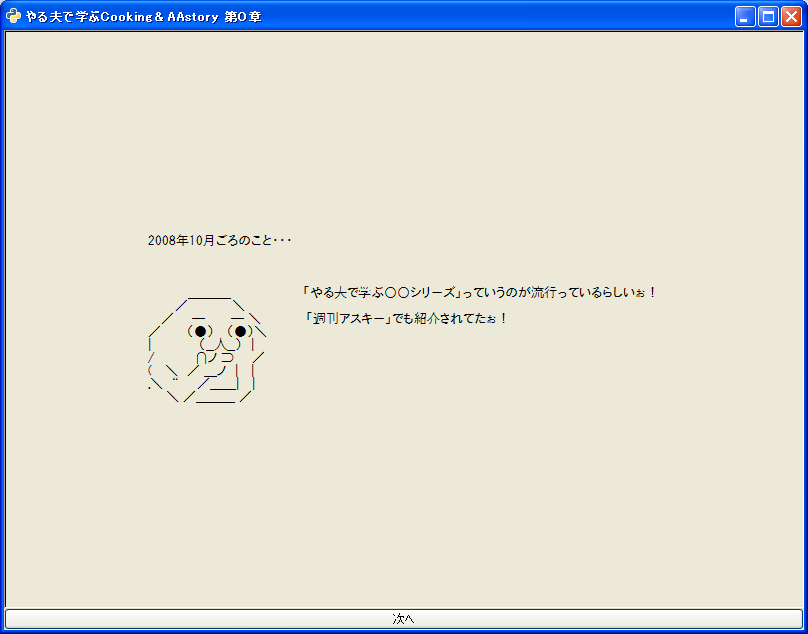
つい勢いでやった。今は反省している。
やる夫で学ぶCooking&AAstory 第0章 http://d.hatena.ne.jp/lionfan/20090105#1231170925
pygtk-aaview
#! /usr/bin/python
# -*- coding: utf-8 -*-
import sys
import os
import gtk
import pango
import urllib
from BeautifulSoup import BeautifulSoup

win = gtk.Window()
win.connect('destroy', gtk.main_quit)
win.set_default_size(800, 600)
win.set_title('やる夫で学ぶCooking&AAstory 第0章')

table = gtk.Table(1, 2, False)
win.add(table)

swin = gtk.ScrolledWindow()
swin.set_policy(gtk.POLICY_AUTOMATIC, gtk.POLICY_AUTOMATIC)

l = gtk.Label('')
l.set_alignment(0.5, 0.5)
fonts = ['Mona 10', 'MS UI Gothic 10']
for fn in fonts:
  try:
    font = pango.FontDescription(fn)
    if font:
      l.modify_font(font)
      break
  except:
    pass
swin.add_with_viewport(l)

table.attach(swin,
  # X direction           Y direction
  0, 1,                   0, 1,
  gtk.EXPAND | gtk.FILL,  gtk.EXPAND | gtk.FILL,
  0,                      0)

b = gtk.Button('次へ')
def button_clicked(widget):
  if len(ascii_arts) == 0:
    gtk.main_quit()
    return
  elif len(ascii_arts) == 1:
    b.set_label('閉じる')
  text = ''.join(ascii_arts.pop(0).findAll(text=True))
  l.set_text(text)

b.connect('clicked', button_clicked)

table.attach(b,
  # X direction           Y direction
  0, 1,                   1, 2,
  gtk.EXPAND | gtk.FILL,  0,
  0,                      0)

html = urllib.urlopen('http://d.hatena.ne.jp/lionfan/20090105#1231170925').read().decode('euc-jp', 'ignore')
soup = BeautifulSoup(html, convertEntities='html')
ascii_arts = soup.findAll('div', { 'class' : 'ascii-art'})
b.emit('clicked')

win.show_all()

try:
  gtk.main()
except KeyboardInterrupt:
  gtk.main_quit()
追記
第1章も作った...というかタイトルとURL変えただけだが...
#! /usr/bin/python
# -*- coding: utf-8 -*-
import sys
import os
import gtk
import pango
import urllib
from BeautifulSoup import BeautifulSoup

win = gtk.Window()
win.connect('destroy', gtk.main_quit)
win.set_default_size(800, 600)
win.set_title('やる夫で学ぶCooking&AAstory 第1章')

table = gtk.Table(1, 2, False)
win.add(table)

swin = gtk.ScrolledWindow()
swin.set_policy(gtk.POLICY_AUTOMATIC, gtk.POLICY_AUTOMATIC)

l = gtk.Label('')
l.set_alignment(0.5, 0.5)
fonts = ['Mona 10', 'MS UI Gothic 10']
for fn in fonts:
  try:
    font = pango.FontDescription(fn)
    if font:
      l.modify_font(font)
      break
  except:
    pass
swin.add_with_viewport(l)

table.attach(swin,
  # X direction           Y direction
  0, 1,                   0, 1,
  gtk.EXPAND | gtk.FILL,  gtk.EXPAND | gtk.FILL,
  0,                      0)

b = gtk.Button('次へ')
def button_clicked(widget):
  if len(ascii_arts) == 0:
    gtk.main_quit()
    return
  elif len(ascii_arts) == 1:
    b.set_label('閉じる')
  text = ''.join(ascii_arts.pop(0).findAll(text=True))
  l.set_text(text)

b.connect('clicked', button_clicked)

table.attach(b,
  # X direction           Y direction
  0, 1,                   1, 2,
  gtk.EXPAND | gtk.FILL,  0,
  0,                      0)

html = urllib.urlopen('http://d.hatena.ne.jp/lionfan/20090106#1231249409').read().decode('euc-jp', 'ignore')
soup = BeautifulSoup(html, convertEntities='html')
ascii_arts = soup.findAll('div', { 'class' : 'ascii-art'})
b.emit('clicked')

win.show_all()

try:
  gtk.main()
except KeyboardInterrupt:
  gtk.main_quit()
Posted at by


2008/12/16


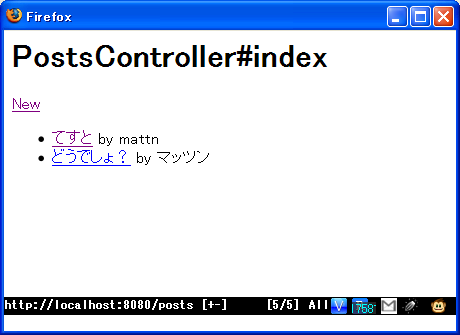
GAEOにScaffoldのジェネレータが付いた。どれだけ速くアプリケーションを作れるか。

アプリケーションを作る

# gaeo.py gaeotter
The "gaeotter" project has been created.

# cd gaeotter

Scaffoldを作る

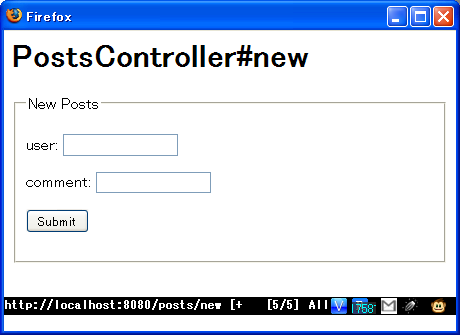
# gaeogen.py scaffold posts index new show user:StringProperty(required=True) comment:StringProperty(required=True)
Creating Model posts ...
Creating .../gaeotter/application/model/posts.py ...
Creating .../gaeotter/application/templates/posts ...
Creating .../gaeotter/application/templates/posts/index.html ...
Creating .../gaeotter/application/templates/posts/new.html ...
Creating .../gaeotter/application/templates/posts/show.html ...
Creating Controller posts ...
Creating .../gaeotter/application/controller/posts.py ...

テンプレートを少しだけ編集する

# vim application/templates/posts/index.html
# cat !$
<h1>PostsController#index</h1>
<a href="/posts/new">New</a>
<ul>
{% for rec in result %}
    <li><a href="/posts/show?key={{ rec.key }}">{{ rec.comment|escape }}</a> by {{ rec.user|escape }}</li>
{% endfor %}
</ul>

# vim application/templates/posts/show.html
# cat !$
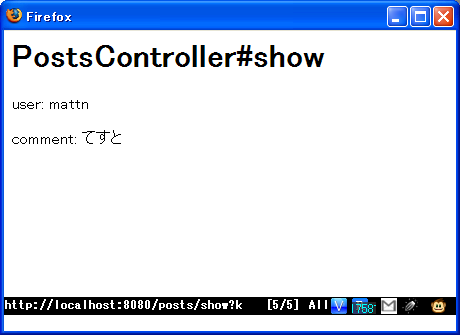
<h1>PostsController#show</h1>
<p>user: {{ user|escape }}</p>
<p>comment: {{ comment|escape }}</p>


起動する

# dev_appserver.py gaeotter
INFO     2008-12-16 05:03:03,546 appcfg.py] Server: appengine.google.com
INFO     2008-12-16 05:03:03,937 appcfg.py] Checking for updates to the SDK.
INFO     2008-12-16 05:03:04,437 appcfg.py] The SDK is up to date.
INFO     2008-12-16 05:03:05,062 dev_appserver_main.py] Running application gaeo
tter on port 8080: http://localhost:8080
# firefox http://localhost:8080/posts/
gaeo-example001

gaeo-example002

gaeo-example003


結論

Google App Engine Oilすばらしい。
Posted at by