私もこれまで色々なWindowsアプリケーションを作ってきましたが、それらの多くはデスクトップ上で目的の動作だけを実行する単純なアプリケーションだったりします。
最近のテキストエディタ等では、マクロ等と呼ばれる拡張言語を使用してエディタ本来の動作では実現出来ない色々な追加機能を実行する事が出来る様になっています。
今日は、既存のWin32アプリケーションにJavaScriptでマクロが実行出来る様にする為のtipsをご紹介。
拡張言語といってもJavaScriptの様に柔軟性のある言語を作り直すとなると程遠い工数を掛けてしまう事になりますが、Windowsには「ScriptControl」というスクリプト実行コンポーネントが用意されています。
今回はこれを使って外部にあるJavaScriptファイルを実行し、かつそのJavaScriptからアプリケーション内のオブジェクトを操作するまでを説明します。ScriptControlはCOMで実装されており、以下の様にインスタンスを生成します。
    hr = CoCreateInstance(

            CLSID_ScriptControl,

            NULL,

            CLSCTX_ALL,

            IID_IScriptControl,

            (void**)&pScriptCtrl);
そしてJavaScript(JScript)を実行させる為にLanguageプロパティを設定してExecuteStatementを実行します。
    hr = pScriptCtrl->put_Language(_bstr_t("JScript"));

    hr = pScriptCtrl->put_Timeout(-1);

    hr = pScriptCtrl->put_AllowUI(VARIANT_FALSE);

    hr = pScriptCtrl->ExecuteStatement(A2BSTR("var a = 'test'"));
これだけで既存のアプリケーションからJavaScriptが実行出来るようになります。
ただこれだけでは既存アプリケーションとの連携はまったく無く、面白味がありませんし単なる計算言語にしか成り得ません。
ブラウザ上で実行されるJavaScriptの様にwindowオブジェクトも無ければdocumentオブジェクトもありません。
つまりalertは使えません
このオブジェクトをJavaScript上に追加するのがAddObjectメソッドです。
AddObjectメソッドは名称指定でIUnknownオブジェクトをJavaScriptの実行スコープに追加出来ます。
ここに既存アプリケーションのオブジェクトを差し込む事になります。JavaScriptではメソッドを呼び出そうとする際にそのオブジェクトに対してIDispatchへのQueryInterfaceを試み、GetIDsOfNamesでdispIDを取得した後にInvokeメソッドを呼び出します。
この辺は、COMの知識のある方ならば既にご存知ですね。
で実装したIDispatchは以下の様なコードになりました。
class MyObject : public IDispatch
{
private:
LONG m_cRef;
typedef HRESULT (MyObject::*Func)(DISPPARAMS*, VARIANT*);
typedef struct _MY_OBJECT_METHOD_TABLE {
_MY_OBJECT_METHOD_TABLE(DISPID dispid, const char* name, Func fn) {
this->dispid = dispid;
this->name = name;
this->fn = fn;
}
DISPID dispid;
const char* name;
Func fn;
} MY_OBJECT_METHOD_TABLE;
std::vector<MY_OBJECT_METHOD_TABLE> myObjectMethodTable;
public:
HRESULT say(DISPPARAMS* pDispParams, VARIANT* ret) {
USES_CONVERSION;
for(int n = 0; n < pDispParams->cArgs; n++) {
HRESULT hr;
VARIANT arg;
VariantInit(&arg);
hr = VariantChangeType(&arg, &pDispParams->rgvarg[n], 0, VT_BSTR);
MessageBox(0, OLE2T(arg.bstrVal), _T("MyObject"), MB_OK);
}
if (ret) {
VariantInit(ret);
V_VT(ret) = VT_BOOL;
V_BOOL(ret) = VARIANT_TRUE;
}
return S_OK;
}
HRESULT start(DISPPARAMS* pDispParams, VARIANT* ret) {
USES_CONVERSION;
for(int n = 0; n < pDispParams->cArgs; n++) {
HRESULT hr;
VARIANT arg;
VariantInit(&arg);
hr = VariantChangeType(&arg, &pDispParams->rgvarg[n], 0, VT_BSTR);
ShellExecute(NULL, _T("open"), OLE2T(arg.bstrVal), NULL, NULL, SW_SHOW);
}
if (ret) {
VariantInit(ret);
V_VT(ret) = VT_BOOL;
V_BOOL(ret) = VARIANT_TRUE;
}
return S_OK;
}
MyObject() : m_cRef(0) {
myObjectMethodTable.push_back(MY_OBJECT_METHOD_TABLE(1, "say", say));
myObjectMethodTable.push_back(MY_OBJECT_METHOD_TABLE(2, "start", start));
}
STDMETHODIMP QueryInterface(REFIID rid, LPVOID *ppv) {
*ppv = NULL;
if (::IsEqualIID(rid, IID_IUnknown)) {
*ppv = this;
AddRef();
return S_OK;
}
if (::IsEqualIID(rid, IID_IDispatch)) {
*ppv = this;
AddRef();
return S_OK;
}
return E_NOINTERFACE;
}
ULONG STDMETHODCALLTYPE AddRef() {
ULONG ref = InterlockedIncrement(&m_cRef);
return ref;
}
ULONG STDMETHODCALLTYPE Release() {
ULONG ref = InterlockedDecrement(&m_cRef);
return ref;
}
STDMETHODIMP GetTypeInfoCount(UINT *ptiCount) {
if (ptiCount) *ptiCount = 0;
return S_OK;
}
STDMETHODIMP GetTypeInfo(UINT iTInfo, LCID lcid, ITypeInfo **pptInfo) {
if (pptInfo) *pptInfo = NULL;
return S_OK;
}
STDMETHODIMP GetIDsOfNames(REFIID riid, OLECHAR **rgszNames, UINT cNames, LCID lcid, DISPID *rgDispID) {
USES_CONVERSION;
for(UINT n = 0; n < cNames; n++) {
std::vector<MY_OBJECT_METHOD_TABLE>::iterator it = myObjectMethodTable.begin();
for(it = myObjectMethodTable.begin(); it != myObjectMethodTable.end(); it++) {
if (!strcmp(it->name, OLE2A(rgszNames[n]))) {
rgDispID[n] = it->dispid;
break;
}
}
if (it == myObjectMethodTable.end()) return E_UNEXPECTED;
}
return S_OK;
}
STDMETHODIMP Invoke(DISPID dispID, REFIID riid, LCID lcid, WORD wFlags, DISPPARAMS *pDispParams, VARIANT *pVarResult, EXCEPINFO *pExcepInfo, UINT *puArgErr) {
std::vector<MY_OBJECT_METHOD_TABLE>::iterator it = myObjectMethodTable.begin();
for(it = myObjectMethodTable.begin(); it != myObjectMethodTable.end(); it++) {
if (it->dispid == dispID) {
return (this->*(it->fn))(pDispParams, pVarResult);
}
}
if (it == myObjectMethodTable.end()) return E_UNEXPECTED;
return S_OK;
}
};
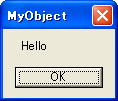
単純に引数の文字列をメッセージボックスで表示する「say」メソッドと、引数の文字列をプログラムとして起動する「start」メソッドを実装しています。
これを実行する「plugin.js」は以下の様になります。
MyObject.say('Hello');

MyObject.start('http://mattn.kaoriya.net');
これを実行すると「Hello」というメッセージボックスが表示された後、このサイトがブラウザで表示される結果となります。
全体のソースコードは以下の通り。
#include <atlbase.h>
#include <windows.h>
#include <string>
#include <vector>
#import <msscript.ocx> raw_interfaces_only, named_guids, no_namespace
#pragma comment(lib, "ole32.lib")
#pragma comment(lib, "shell32.lib")
class MyObject : public IDispatch
{
private:
LONG m_cRef;
typedef HRESULT (MyObject::*Func)(DISPPARAMS*, VARIANT*);
typedef struct _MY_OBJECT_METHOD_TABLE {
_MY_OBJECT_METHOD_TABLE(DISPID dispid, const char* name, Func fn) {
this->dispid = dispid;
this->name = name;
this->fn = fn;
}
DISPID dispid;
const char* name;
Func fn;
} MY_OBJECT_METHOD_TABLE;
std::vector<MY_OBJECT_METHOD_TABLE> myObjectMethodTable;
public:
HRESULT say(DISPPARAMS* pDispParams, VARIANT* ret) {
USES_CONVERSION;
for(int n = 0; n < pDispParams->cArgs; n++) {
HRESULT hr;
VARIANT arg;
VariantInit(&arg);
hr = VariantChangeType(&arg, &pDispParams->rgvarg[n], 0, VT_BSTR);
MessageBox(0, OLE2T(arg.bstrVal), _T("MyObject"), MB_OK);
}
if (ret) {
VariantInit(ret);
V_VT(ret) = VT_BOOL;
V_BOOL(ret) = VARIANT_TRUE;
}
return S_OK;
}
HRESULT start(DISPPARAMS* pDispParams, VARIANT* ret) {
USES_CONVERSION;
for(int n = 0; n < pDispParams->cArgs; n++) {
HRESULT hr;
VARIANT arg;
VariantInit(&arg);
hr = VariantChangeType(&arg, &pDispParams->rgvarg[n], 0, VT_BSTR);
ShellExecute(NULL, _T("open"), OLE2T(arg.bstrVal), NULL, NULL, SW_SHOW);
}
if (ret) {
VariantInit(ret);
V_VT(ret) = VT_BOOL;
V_BOOL(ret) = VARIANT_TRUE;
}
return S_OK;
}
MyObject() : m_cRef(0) {
myObjectMethodTable.push_back(MY_OBJECT_METHOD_TABLE(1, "say", say));
myObjectMethodTable.push_back(MY_OBJECT_METHOD_TABLE(2, "start", start));
}
STDMETHODIMP QueryInterface(REFIID rid, LPVOID *ppv) {
*ppv = NULL;
if (::IsEqualIID(rid, IID_IUnknown)) {
*ppv = this;
AddRef();
return S_OK;
}
if (::IsEqualIID(rid, IID_IDispatch)) {
*ppv = this;
AddRef();
return S_OK;
}
return E_NOINTERFACE;
}
ULONG STDMETHODCALLTYPE AddRef() {
ULONG ref = InterlockedIncrement(&m_cRef);
return ref;
}
ULONG STDMETHODCALLTYPE Release() {
ULONG ref = InterlockedDecrement(&m_cRef);
return ref;
}
STDMETHODIMP GetTypeInfoCount(UINT *ptiCount) {
if (ptiCount) *ptiCount = 0;
return S_OK;
}
STDMETHODIMP GetTypeInfo(UINT iTInfo, LCID lcid, ITypeInfo **pptInfo) {
if (pptInfo) *pptInfo = NULL;
return S_OK;
}
STDMETHODIMP GetIDsOfNames(REFIID riid, OLECHAR **rgszNames, UINT cNames, LCID lcid, DISPID *rgDispID) {
USES_CONVERSION;
for(UINT n = 0; n < cNames; n++) {
std::vector<MY_OBJECT_METHOD_TABLE>::iterator it = myObjectMethodTable.begin();
for(it = myObjectMethodTable.begin(); it != myObjectMethodTable.end(); it++) {
if (!strcmp(it->name, OLE2A(rgszNames[n]))) {
rgDispID[n] = it->dispid;
break;
}
}
if (it == myObjectMethodTable.end()) return E_UNEXPECTED;
}
return S_OK;
}
STDMETHODIMP Invoke(DISPID dispID, REFIID riid, LCID lcid, WORD wFlags, DISPPARAMS *pDispParams, VARIANT *pVarResult, EXCEPINFO *pExcepInfo, UINT *puArgErr) {
std::vector<MY_OBJECT_METHOD_TABLE>::iterator it = myObjectMethodTable.begin();
for(it = myObjectMethodTable.begin(); it != myObjectMethodTable.end(); it++) {
if (it->dispid == dispID) {
return (this->*(it->fn))(pDispParams, pVarResult);
}
}
if (it == myObjectMethodTable.end()) return E_UNEXPECTED;
return S_OK;
}
};
char* loadScriptAlloc(LPCTSTR pszFileName) {
HANDLE hFile;
DWORD dwFileSize, dwReadSize;
char* pszData = NULL;
hFile = CreateFile(
pszFileName,
GENERIC_READ,
FILE_SHARE_READ,
NULL,
OPEN_EXISTING,
FILE_ATTRIBUTE_NORMAL,
NULL);
if (hFile == INVALID_HANDLE_VALUE) goto leave;
dwFileSize = GetFileSize(hFile , NULL);
if (dwFileSize == (DWORD)-1) goto leave;
pszData = (char*)calloc(dwFileSize + 1, 1);
if (!pszData) goto leave;
if (!ReadFile(
hFile,
pszData,
dwFileSize,
&dwReadSize, NULL)) goto leave;
leave:
if (hFile != INVALID_HANDLE_VALUE) CloseHandle(hFile);
return pszData;
}
int main(int argc, char *argv[]) {
USES_CONVERSION;
HRESULT hr = 0;
IScriptControl* pScriptCtrl = NULL;
char* pszCode = NULL;
MyObject* pMyObject = NULL;
CoInitialize(NULL);
hr = CoCreateInstance(
CLSID_ScriptControl,
NULL,
CLSCTX_ALL,
IID_IScriptControl,
(void**)&pScriptCtrl);
if (FAILED(hr) || !pScriptCtrl) goto leave;
hr = pScriptCtrl->put_Language(_bstr_t("JScript"));
if (FAILED(hr)) goto leave;
hr = pScriptCtrl->put_Timeout(-1);
if (FAILED(hr)) goto leave;
hr = pScriptCtrl->put_AllowUI(VARIANT_FALSE);
if (FAILED(hr)) goto leave;
pMyObject = new MyObject();
hr = pScriptCtrl->AddObject(_bstr_t("MyObject"), pMyObject, VARIANT_TRUE);
pszCode = loadScriptAlloc(_T("plugin.js"));
if (!pszCode) goto leave;
hr = pScriptCtrl->ExecuteStatement(A2BSTR(pszCode));
free(pszCode);
pszCode = NULL;
leave:
if (pszCode) {
free(pszCode);
pszCode = NULL;
}
if (pScriptCtrl) {
pScriptCtrl->Reset();
pScriptCtrl->Release();
pScriptCtrl = NULL;
}
if (pMyObject) {
pMyObject->Release();
pMyObject = NULL;
}
CoUninitialize();
return 0;
}
あとはこの「say」メソッドなり「start」メソッドなりを既存アプリケーションとの連携用メソッドとして実装すれば、見事JavaScriptによるプラグイン機能が実現出来ます。
意外と少ないコードで実装出来るので皆さん昔に作ったアプリケーション等を拡張して見られてはどうでしょうか。


 spreadsheetとつながってるってやばいじゃんこれspreadsheetをバックエンドdbにしていろいろできるってことでしょ